This tool allows you to crop a signature from any image easily using a smooth, touch-friendly interface. It works directly in your browser — no uploads to a server, no watermark, and no quality loss.
Whether you want a square or circular signature, this cropper helps you extract a clean signature image for documents, forms, or digital use.
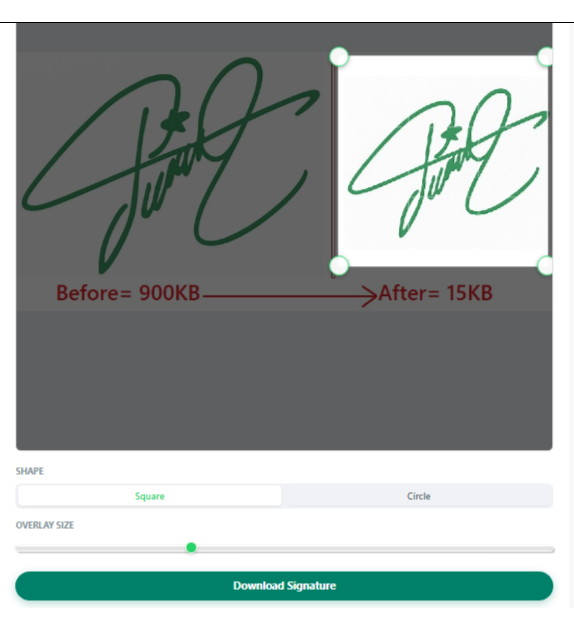
✨ Key Features
- ✅ Upload any image (PNG, JPG, JPEG)
- ✅ Drag & resize crop box smoothly
- ✅ Square or circular signature crop
- ✅ Touch & mobile friendly
- ✅ High-quality output (1000×1000 px)
- ✅ No signup required
- ✅ Works fully offline in your browser
🖼️ How the Signature Crop Tool Works
1. Upload Your Image
Click “Tap to Upload Image” and select an image containing your signature.
2. Adjust the Crop Area
- Drag the crop box to position it over your signature
- Resize using the corner handles
- Use the Overlay Size slider for quick scaling
3. Choose Shape
- Square – best for documents and forms
- Circle – useful for profile or stamp-style signatures
4. Download Cropped Signature
Click “Download Signature” to instantly save a high-quality PNG file.
⚙️ Technical Highlights (Behind the Scenes)
This tool is built using pure HTML, CSS, and JavaScript:
- Pointer Events API for smooth dragging and resizing
- Canvas API for accurate image cropping
- Percentage-based scaling to maintain responsiveness
- Client-side processing (your image never leaves your device)
- Object-fit calculations to preserve original image quality
The final output is generated at 1000×1000 pixels, ensuring your signature remains sharp and professional.
📱 Mobile & Touch Optimized
- Large resize handles for touch screens
- Disabled browser zoom & scroll conflicts
- Smooth performance on Android & iOS
Perfect for cropping signatures directly from a phone.
🔒 Privacy Friendly
Your images are:
- ❌ Not uploaded to any server
- ❌ Not stored or tracked
- ✅ Processed entirely in your browser
🎯 Best Use Cases
- Crop handwritten signatures
- Create digital signatures for PDFs
- Extract signatures from scanned documents
- WhatsApp DP style signature images
- Professional document signing
🚀 Why Use This Signature Crop Tool?
Unlike basic image croppers, this tool is specifically optimized for signature cropping — giving you precise control, clean edges, and flexible shapes without complexity.